
The challenge
The pharmacy’s help desk handled phone calls, emails, and portal messages from its customers. A merger had already pushed request volumes up. The pharmacy then added a text channel so that its hundreds of thousands of customers, many of them elderly, could reach the help desk easily. Many had limited access to the other channels and often needed help outside business hours.
Volume rose again, and response times slipped from minutes or hours to days. Some older requests, judged not urgent, never got a reply at all.
What we built
Working with channel partner Gobi Technologies, Progentic AI built a system that pairs AI with fixed business rules and works in three stages.
First, every request is read and the customer’s identity is verified through the channel they used. The system matches the request to the right patient record and confirms the match before going any further. It then adds the customer’s contact history, both recent and on the same subject, and the AI works out what the customer is asking for.
Next, a fixed set of rules decides whether the request can be handled automatically or must go to a person. Certain topics and actions are never automated, whatever the AI suggests.
Finally, the system plans the response. It works out what information it needs, gathers it, and proposes the next best action. Requests cleared for automation are completed straight away. For the rest, the findings and recommended action are attached to the ticket and placed in a queue for staff to review.
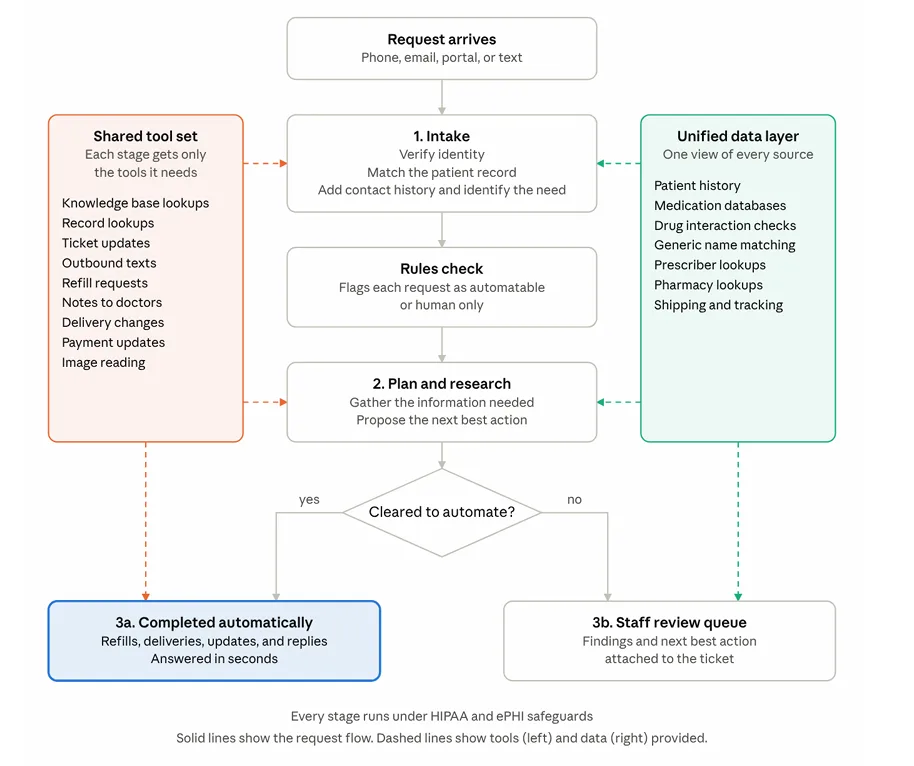
Each stage only has access to the tools it needs. Across the system, those tools let it look up answers in the pharmacy’s knowledge base and records, update tickets, text customers, request refills, pass a patient’s request for a change on to their doctor, reschedule deliveries, update payment details, and read images customers send in. It draws on prescriber and pharmacy lookups, drug interaction checks, brand and generic medication matching, patient history, medication databases, and shipping and tracking information.
All of this runs in line with HIPAA and the rules for protecting electronic protected health information (ePHI).
The results
At launch, the system was handling about 6,000 inbound requests a week. On average, about two thirds of requests are resolved with no human involvement, rising to as much as 70%, or around 4,200 a week at peak. When a request does go to staff, the research is already done and a next step is waiting for them. Only about 5% of requests reach a person without useful groundwork from the system.
Average response time fell from days back to minutes, and automated requests are answered in seconds. Because the system runs around the clock, customers can get help outside business hours, which was the reason the text channel was added in the first place.
The design also allows new channels, tools, data sources, and actions to be added as volumes and needs grow.